One intelligent layer across your existing storage and version control. Find any 2D, 3D, Playable or video asset by character, scene, campaign or visual content — then preview, review and QC it without moving the original files.
No migration · Connect in minutes · Works with Drive, Dropbox, Box, Git, Perforce & more
Artstash learns your game's story and finds any asset from a plain-English search — no filenames, no manual tags.
Every asset pre-screened against your brand guidelines before a human sees it. Fewer revision rounds, nothing off-brand.
Google Drive, Dropbox, Box, OneDrive, Git, Perforce, Diversion — Artstash syncs on top. Your files never move.
Keep your files where they are. Work as if they're all in one place.
Your studio already has assets spread across cloud storage, version control and production tools. Artstash sits on top of them — indexing, previewing and organising everything without forcing a migration.
Start seeing your assets clearly
No software needed! Artstash previews advanced 2D & 3D files like FBX, OBJ, 3DS, GLTF, PSD, PSB, AI, AVI, SVG, and many more. All in the web browser.
Search by what's in the asset — not what someone named the file.
Find assets using natural language, visual content, characters, environments, campaigns, dimensions, formats, metadata and more.
“Find vertical videos featuring the Barbarian on a snow map.”
Artstash automatically enriches every asset so your team can find the right creative in seconds.
One home for every asset, built for the way creative teams actually work — no bloat, no learning curve.
🗂️
All your video and game assets in one place.
👥
Everyone can access assets, no technical skills or software required.
☁️
Artstash deploys instantly. No complex installations needed.
🤝
Work with external collaborators and clients. Easy & secure sharing.
Artstash has a free plan — no credit card required.
Files stay in your existing storage and version-control systems — Artstash indexes on top.
View 2D, video, HTML5 and 3D assets directly in the browser.
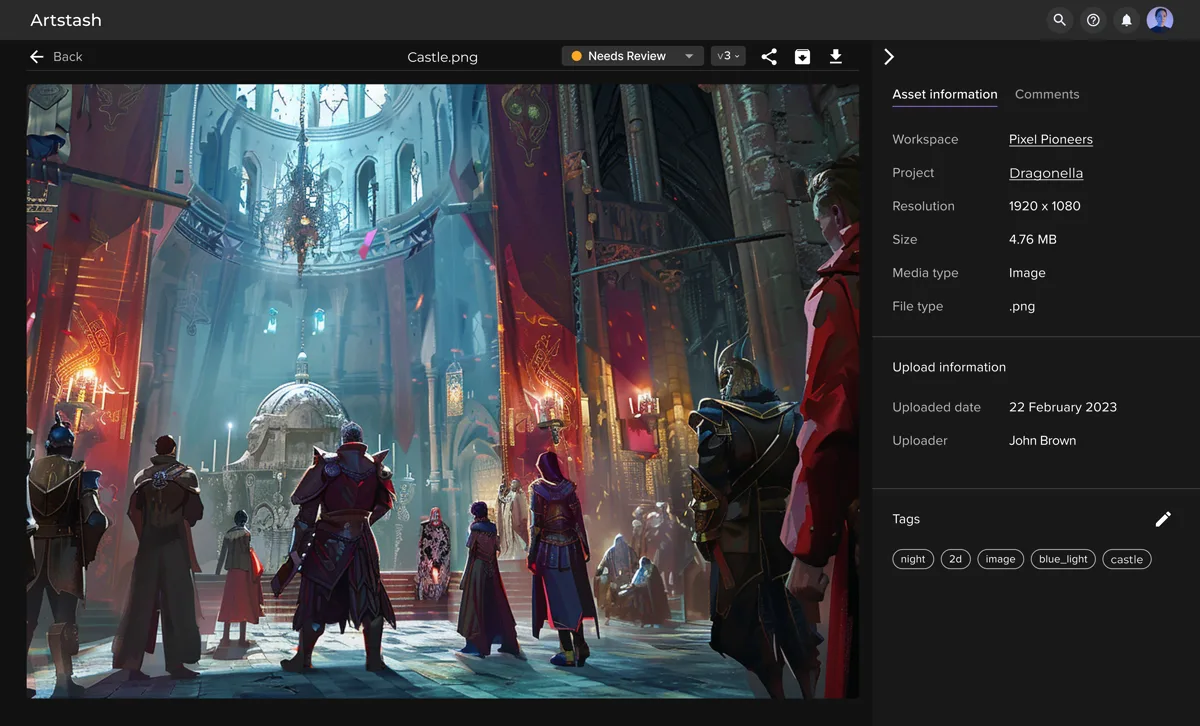
Stop hunting through folders, Slack threads and old campaigns.
Comments, approvals and feedback stay attached to the asset.
Automatically tag characters, environments, campaigns and creative attributes.
Automatically check creatives against brand, platform and campaign requirements.
Let AI do the first round of creative review.
Every new creative can be automatically checked for the things your team normally catches manually: spelling, logos, end cards, app-store badges, age ratings, disclaimers, brand rules, dimensions, duration and campaign requirements.
Your reviewers focus on creative decisions. Artstash handles the checklist.
From art to code to marketing — one library for everyone.
“
Artstash gives me direct access to all the assets of the game-dev team without interfering with their workflow. I can use assets in my content and share with collaborators.

Marketing Manager
“
Artstash gives me direct access to all the assets of the game-dev team without interfering with their workflow. I can use assets in my content and share with collaborators.

Artist
“
Artstash gives me direct access to all the assets of the game-dev team without interfering with their workflow. I can use assets in my content and share with collaborators.

Developer
Connect a source and Artstash starts indexing your assets. Your originals remain where they already live while Artstash makes them searchable, previewable and ready for AI workflows.
Connect in minutes. Keep your existing workflow.
01
Find characters, props, environments and lore-related assets faster.
02
View FBX, OBJ, GLTF, PSD and more without specialist software.
03
Designed around creative production workflows, not generic file storage.
04
Automatically review assets for production problems before they slow down your team.
05
Centralise assets from Google Drive, Dropbox, Box, OneDrive, Git, Perforce and Diversion so teams can find, tag and reuse work faster.
Artstash is an AI-powered digital asset manager (DAM) for game and video teams. It syncs with your existing storage and version control, previews 2D, 3D, and video files in the browser, autotags every asset, and runs automated QC against your brand guidelines.
Your files stay in your own storage and version control — Artstash syncs on top rather than taking custody of your data. Artstash runs on Microsoft Azure and supports single sign-on (SSO), with access controlled by role-based permissions, private workspaces, and secure, revocable share links.
Artstash previews advanced 2D and 3D formats directly in the browser — FBX, OBJ, 3DS, GLTF, PSD, PSB, AI, SVG, and video files among many more — with no specialist software needed.
No. Artstash connects to Google Drive, Dropbox, Box, OneDrive, Git, Perforce Helix Core, and Diversion. Your files stay exactly where they are, and setup takes minutes.
The Search Agent learns your game's lore so anyone can find assets with a plain-English search. The QC Agent pre-screens every asset against your brand guidelines before a human reviews it.
Creative review is free forever to sign up and use. Paid plans start at $249/month for Studio Lite, with unlimited users on every plan and a free trial available. See pricing for details.
Still researching? Read our complete guide to AI asset management, see how we compare in Artstash vs Air, or compare every plan.
Turn your scattered 2D, 3D and video libraries into a searchable, reviewable, AI-powered creative workspace.
See Artstash in action